Place a bookmark in a Word Document
Use Control + Shift + F5 to create a bookmark in Microsoft Word. Learn more ways that Word can make your life easier with a training class from AETC.
Place a bookmark in a Word Document Read Post »

Use Control + Shift + F5 to create a bookmark in Microsoft Word. Learn more ways that Word can make your life easier with a training class from AETC.
Place a bookmark in a Word Document Read Post »
Use tables in Word to create complex looking layouts. This video describes how to edit a table’s borders to organize data in a way that looks complex and difficult, but is in fact very simple. Create professional, polished documents with
Complex layouts with Word Tables Read Post »
The eraser feature in Microsoft Word allows a user to merge cells by erasing cell borders. Learn to use Word to create polished, professional documents with a training class from AETC.
Use Eraser in Word Tables Read Post »
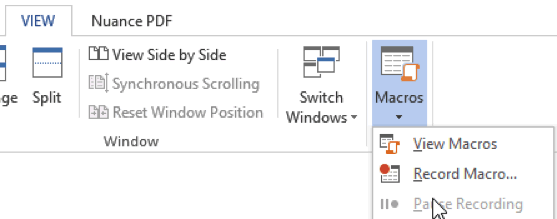
Did you know Macros are a part of all the Microsoft products? When setup properly, Macros can help automate tasks that you perform routinely. There are slight differences between applications, such as: Word and Excel – Of the main 4
This video describes how to apply a set of styles to an existing document by use of a saved template. See this video to learn to save styles as templates. Learn to make professional and polished documents with a Word
Apply styles from a template to an existing document Read Post »
Styles and templates reduce redundant work reformatting similar document. This video describes how to save styles as templates in Microsoft Word. Learn more ways to create polished documents with a Word training class from AETC.
Saving Styles as a template in Word Read Post »
Use the Advanced Find and Replace tool in Word to make several changes quickly to a document. For more ways to make Word work harder for you, take a training class from AETC.
Edit Word formatting with find and replace Read Post »
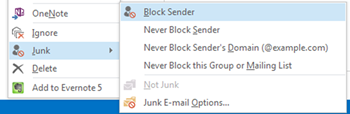
There are a few ways to block spam from ever appearing in your inbox. Most reputable marketers will have unsubscribe links at the bottom of their emails. (For example, there is one such link at the bottom of our Just
For more ways to make Word work for you, taking a training course from AETC.
Use the F4 key to repeat an action in Word. Read Post »
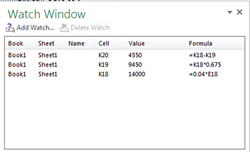
In some large Excel workbooks a dependent cell may refer to a precedent cell on another worksheet or many rows or columns away. The Excel Watch Window lets you see the dependent cell adjust as you make changes to the
Excel Watch Window Read Post »