Use Eraser in Word Tables
The eraser feature in Microsoft Word allows a user to merge cells by erasing cell borders. Learn to use Word to create polished, professional documents with a training class from AETC.
Use Eraser in Word Tables Read Post »

The eraser feature in Microsoft Word allows a user to merge cells by erasing cell borders. Learn to use Word to create polished, professional documents with a training class from AETC.
Use Eraser in Word Tables Read Post »
This video describes how to apply a set of styles to an existing document by use of a saved template. See this video to learn to save styles as templates. Learn to make professional and polished documents with a Word
Apply styles from a template to an existing document Read Post »
Styles and templates reduce redundant work reformatting similar document. This video describes how to save styles as templates in Microsoft Word. Learn more ways to create polished documents with a Word training class from AETC.
Saving Styles as a template in Word Read Post »
Use the Advanced Find and Replace tool in Word to make several changes quickly to a document. For more ways to make Word work harder for you, take a training class from AETC.
Edit Word formatting with find and replace Read Post »
For more ways to make Word work for you, taking a training course from AETC.
Use the F4 key to repeat an action in Word. Read Post »

In Microsoft Word, the Find and Replace feature will locate not only text but formatting characters as well. These characters include items like paragraph symbols and the non-breaking spaces that sometimes appear when you copy text from a Mac. To
Searching for Special Characters in Word Read Post »

One common frustration with Word auto-formatting is that it continues the numbering between two lists. In the example below, Microsoft numbered the first point of the second list number 5 instead of 1. To Fix this, just right click on
Restart numbering at 1 Read Post »

When you want to use numbered or bulleted lists, but each point requires more than one paragraph, use Shift + Enter to insert a blank line. Learn to make documents like a pro with a Word training course from AETC
Paragraph breaks in lists Read Post »
The Screenshot feature in Microsoft Word can be used to capture a picture of any open window, or a part of any open Window. Learn to create polished documents with a Word training course from AETC
Screenshot and Screen Clipping into a Word Document Read Post »
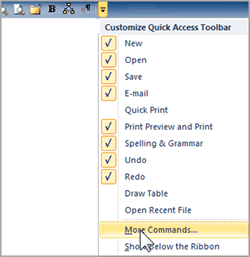
Many of you may have been wondering what happened to the Print Preview Edit View that was easily accessible in Microsoft Word 2003. You can still use this view in Word 2010 to make adjustments to your document in Print Preview by
Print Preview Edit View in Microsoft Word Read Post »