Alt key in Excel
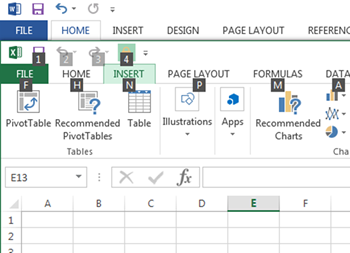
If you are a command key user, then you will probably like the Key Tip option. Simply press the Alt key and letters will appear in the ribbon. Press the key that corresponds to the tab you wish to enter,
If you are new to Excel, there is a great tool called “Flash Fill”, that allows you to fill in cells based on information in other columns, along with additional information typed in the column being flash filled. This video
Flash Fill in Excel Read Post »
A Timeline can be inserted into your PivotChart, if dates are listed in your table. After you insert your PivotChart, add a Timeline, located in the Filters group of the Insert tab. Watch this short video to see how Timeline
Timelines with Excel PivotCharts Read Post »
Unhide all hidden columns in an Excel spreadsheet by selecting the entire spreadsheet and selecting Unhide. . For more ways to make Excel work for you, take a training course from AdvantEdge Training & Consulting!
Unhide Columns in Excel Read Post »
Did you know that you can use the same formulas in calculation columns for SharePoint as you do in Excel? The trick is to remember that you are using fields, instead of cells, so fields must be surrounded by brackets
Use the same formulas & calculations as in Excel. Read Post »
Trace Excel Precedents by selecting a cell with a formula, and hitting Control [ For more ways to make Excel work for you, take a training course from AdvantEdge Training & Consulting!
Trace Excel Precedents with Control [ Read Post »
Make large numbers more readable in Excel by changing their format. For more ways to make Excel work for you, take a training course from AdvantEdge Training & Consulting!
Make large numbers more readable in Excel Read Post »
Use the Add background button in Excel to add a background. Use cell fill colors to keep data readable. For more ways to make Excel work for you, take a training course from AdvantEdge Training & Consulting!
Add a background image in Excel Read Post »
The count function counts the number of cells containing a numeric value. Count A returns the number of cells containing anything. For more ways to make Excel work for you, take a training course from AdvantEdge Training & Consulting!
Count and Count A functions in Excel Read Post »
Are you frustrated with the new look of SharePoint? Did developers build your site, and now it does not visually look the same? You can set the default view of libraries, lists, and sites back to the Classic view by
SharePoint: Frustrated with the new look of SharePoint? Read Post »